
- PirateDiffusion
- Guides
- How to prompt
How to prompt
PirateDiffusion is a command line inside a chat. One message makes one render: a command, the model's ShortCode, a few parameters and your words. Every live example on this page is a real render from the ModelTrends catalog, and its command can be pasted as it is.
1. The render command
Start with /render, name the model in angle brackets, then write what you want to see. Parameters are slash words and may stand anywhere in the message.
/render <krea2> /size:1024x1024 A fantasy knight in full armor with helmet. His sword at belt. In neutral pose. White background.
The examples on this page use <krea2>, the Flux Krea base model, at 1024 pixels; the prompts are real ones from the ModelTrends catalog. Without a model name the bot uses your default model. A different ShortCode is all it takes to try the same prompt on another model.
A live example: the ShortCode, the render's settings as parameters, the prompt and its negative.
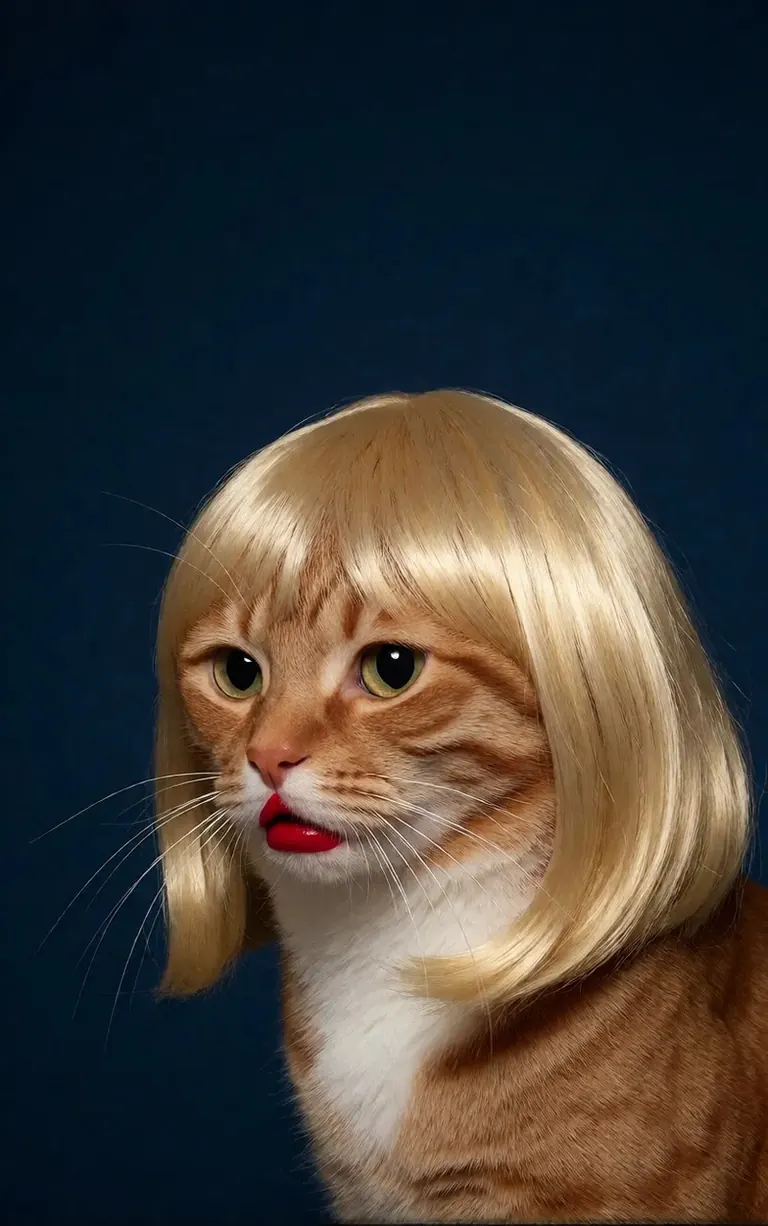
/render <realism-enhancer-krea2> A minimalist, high-contrast studio portrait captures an orange tabby cat wearing a perfectly styled blonde wig with straight bangs, looking off-camera with a grumpy expression and wearing bright red lipstick, featuring rich composition grading and insane sharpness. The cat's smooth, light brown and white fur stands out sharply against a flat, deep dark blue background that serves as a vast expanse of clean negative space. The tight, centered flash composition highlights the realistic texture of the shiny blonde synthetic hair, the cat's long white whiskers, and the glossy red pout, creating a bizarre, authentic, and starkly humorous artistic study.
Krea2 · LoRARender by 6vidit9
<realism-enhancer-krea2>
2. ModelTrends ShortCodes
Every model page on ModelTrends.ai shows a ShortCode box. That ShortCode is the model's name inside PirateDiffusion: put it in the command and the bot loads that model. Thousands of models, LoRAs and embeddings are preloaded, so there is nothing to download.
In the bot, /concepts lists the models and /concept /search finds one by name.
/concepts
/concept /search:anime
Browse the catalog, open a model and copy its ShortCode: ModelTrends.ai
3. Parameters
The parameters in the sample commands are the settings of the original render. Copy them to get the same kind of picture; change the seed to get a new one.
/size:1024x1024 | Width and height in pixels. Current models render at 1024 and up; 1024x1024 is square, 1024x1536 a portrait. |
/portrait /tall /landscape /wide | Shape shortcuts instead of a size. |
/steps:25 | How many denoising steps the render takes; more is slower. |
/guidance:7 | How strictly the prompt is followed. Each model has its own best range. |
/seed:123456 | The random seed. The same seed, guidance, sampler and model give the same picture again. |
/sampler:dpm2m /karras | The sampler, and /karras for the samplers that have that mode. /sampler alone lists them. |
/clipskip:2 | Skips the last layers of the text encoder; some models are trained for 2. |
/images:4 | How many pictures to make from one command. |
Parameters stay in English in every language, the bot reads them as written.
4. Weights, positives and negatives
Double parentheses make a word count more, double square brackets make it count less. The negative, the things to keep out of the picture, goes in square brackets too, usually at the end.
/render <krea2> /size:1024x1024 sketch painting, a rock climber scaling a ((steep cliff)), icy winds, frozen landscape [[blurry, text, watermark]]
Prompts copied from other tools often carry (word:1.3) weights. Add /parser:new and the bot reads them.
/render <krea2> /size:1024x1024 /parser:new sketch painting, a rock climber scaling a (steep cliff:1.3), icy winds, frozen landscape
On SDXL models a negative embedding goes inside the negative with a strength, like this:
[[<fastnegative-xl:-2>]]
5. LoRAs and recipes
A LoRA is a small model that adds one thing: a character, a style, a camera move. It has a ShortCode too and is used the same way, in the command with the prompt. ModelTrends pages tell which base model a LoRA was made for; pair it with that base for the best result.
/render <realism-enhancer-krea2> A minimalist, high-contrast studio portrait captures an orange tabby cat wearing a perfectly styled blonde wig with straight bangs, looking off-camera with a grumpy expression and wearing bright red lipstick, featuring rich composition grading and insane sharpness. The cat's smooth, light brown and white fur stands out sharply against a flat, deep dark blue background that serves as a vast expanse of clean negative space. The tight, centered flash composition highlights the realistic texture of the shiny blonde synthetic hair, the cat's long white whiskers, and the glossy red pout, creating a bizarre, authentic, and starkly humorous artistic study.
Krea2 · LoRARender by 6vidit9
<realism-enhancer-krea2>
A recipe is a saved bundle of words and settings, called by its hashtag. /recipes lists them.
/render <krea2> /size:1024x1024 a fantasy knight in full armor, white background #boost
6. Video and music workflows
Video and audio models run as workflows: /workflow /run: and the workflow's slug, then the prompt. ModelTrends shows the slug in a workflow's ShortCode box as /wf /run:, the short form of the same command.
The slug's first word says what the workflow takes:
video- | Text to video: the prompt alone makes the clip. |
animate- | Image to video: reply to a picture with the command and the prompt says what moves. |
omni- | Either: works from a prompt alone or from a picture you reply to. |
A video LoRA goes between the slug and the prompt. A LoRA made for image input still runs in a text-to-video workflow, but works best when you reply to a picture with the animate workflow; the sample cards say so. A live example:
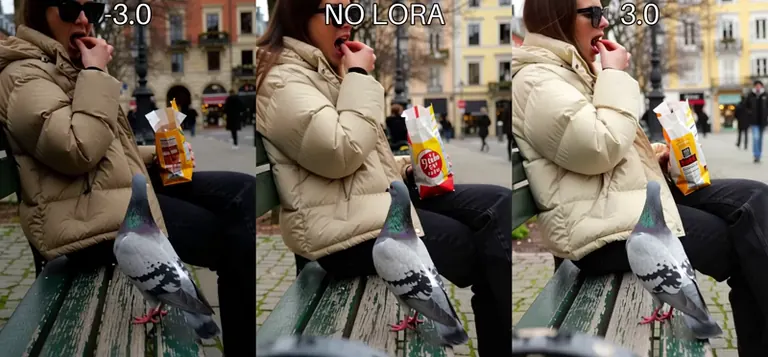
/workflow /run:dasiwa-h3 <exposure-slider-h3> A realistic candid handheld video in a city square. A woman sits on a bench eating a small snack while a pigeon stands directly in front of her staring intensely at the food. She slowly moves the snack away, and the pigeon follows it with its eyes. She moves it left, then right, and the pigeon tracks every movement with exaggerated seriousness. She eventually gives the pigeon a tiny piece and it immediately walks away as if nothing happened. Natural daylight, realistic bird movement, subtle handheld camera shake, deadpan comedy, ordinary everyday environment.
Tip: The prompt is text-to-video, but it also works when you supply your own image. In that case, first paste a photo into your bot (leave the compression check on) then reply to a picture and use /run:animate-dasiwa-h3 instead of /run:dasiwa-h3. Animate means image-to-video (I2V).
H3 · LoRA Render by alcaitiff
 <exposure-slider-h3>
Workflows take extra values in slots, written /slot1: and so on at the end of the message; each workflow's page says what its slots do. Music workflows take the lyrics as the prompt and the genre in a slot.
7. Copy a prompt from ModelTrends
Every example render on a ModelTrends model page has a copy button that gives the prompt with its settings already written as PirateDiffusion parameters. Paste it after /render and the model's ShortCode.
You can write the prompt in your own language. Add /translate and the bot translates it before rendering.
/render <krea2> /size:1024x1024 /translate un caballero de fantasía con armadura completa, fondo blanco
The long versions (the 2024 SDXL guides)
These guides were written for SDXL in 2024. The commands still work; the models and sizes are the ones above.