
- PirateDiffusion
- คู่มือ
- วิธีใช้คำสั่ง
วิธีใช้คำสั่ง
PirateDiffusion คือบรรทัดคำสั่งในแชท ข้อความหนึ่งข้อความสร้างการเรนเดอร์หนึ่งครั้ง: คำสั่ง, ShortCode ของโมเดล, พารามิเตอร์บางอย่าง และคำพูดของคุณ ทุกตัวอย่างสดในหน้านี้คือการเรนเดอร์จริงจากแคตตาล็อก ModelTrends และคำสั่งสามารถคัดลอกไปใช้ได้เลย
Learn your first command: Skills
Type // to create or edit images and videos. You do not need to learn commands or pick a model first. Begin your request with two slashes and the bot picks the best Skill for it: the model, the workflow and the settings that fit your words. Copy this into the chat:
// a gray chubby cat napping in a sunny garden, photo
A confirmation message appears, then the pictures. The buttons under each result let you vote and upscale it.
Change the words and send it again. The more you describe, the closer the picture gets:
// a gray British shorthair cat asleep among peonies in a big garden, soft morning light, realistic photo
Videos work the same way
Ask for motion and the bot picks a video Skill:
// a short video of waves rolling onto a black sand beach at sunset
Edit a photo
Send a photo into the chat first, then reply to it with your request. Putting the word edit in it helps the bot pick an editing Skill:
// edit, make her hair blonde
Pick a Skill yourself
Every Skill also has a name you can run directly, for example /anime-illustrious a warrior standing in the rain. /skill /list shows the Skills available to you, /skill /show:name describes one, and /skill /tune lets you mute the ones you never want picked for you.
When you want full control
The /render and /workflow commands name the exact model, size, steps and seed yourself. That is what the How to prompt lessons and the commands list are for. The original SDXL beginner lesson, with its /render cat examples and bracket weights, is kept as a 2024 guide.
1. คำสั่งเรนเดอร์
เริ่มด้วย /render, ระบุชื่อโมเดลในวงเล็บแหลม แล้วเขียนสิ่งที่คุณต้องการเห็น พารามิเตอร์เป็นคำที่ขึ้นต้นด้วยสแลชและอาจอยู่ที่ใดก็ได้ในข้อความ
/render <krea2> /size:1024x1024 A fantasy knight in full armor with helmet. His sword at belt. In neutral pose. White background.
ตัวอย่างในหน้านี้ใช้ <krea2> โมเดลฐาน Flux Krea ที่ความละเอียด 1024 พิกเซล; คำสั่งเป็นคำสั่งจริงจากแคตตาล็อก ModelTrends. หากไม่มีชื่อโมเดล บอทจะใช้โมเดลเริ่มต้นของคุณ. แค่เปลี่ยน ShortCode ก็สามารถลองคำสั่งเดียวกันกับโมเดลอื่นได้แล้ว.
ตัวอย่างสด: ShortCode, การตั้งค่าการเรนเดอร์เป็นพารามิเตอร์, คำสั่งและคำสั่งเชิงลบ.
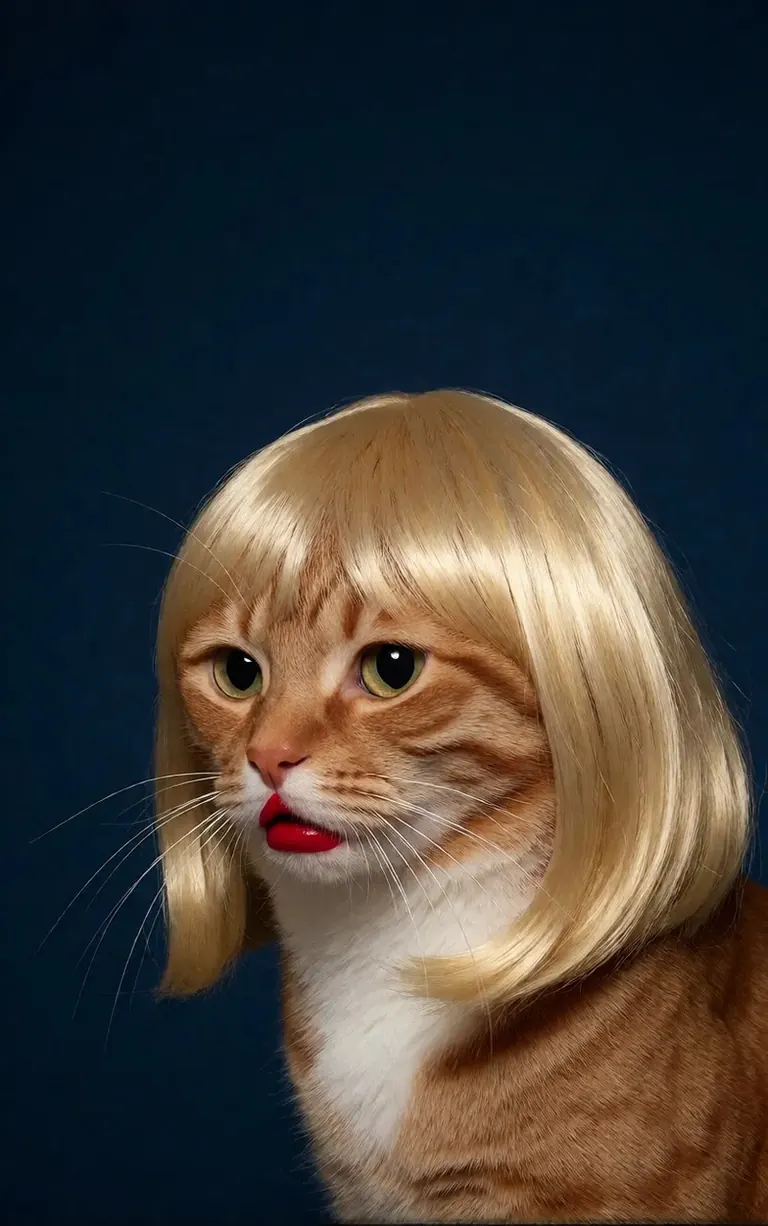
/render <realism-enhancer-krea2> A minimalist, high-contrast studio portrait captures an orange tabby cat wearing a perfectly styled blonde wig with straight bangs, looking off-camera with a grumpy expression and wearing bright red lipstick, featuring rich composition grading and insane sharpness. The cat's smooth, light brown and white fur stands out sharply against a flat, deep dark blue background that serves as a vast expanse of clean negative space. The tight, centered flash composition highlights the realistic texture of the shiny blonde synthetic hair, the cat's long white whiskers, and the glossy red pout, creating a bizarre, authentic, and starkly humorous artistic study.
Krea2 · LoRAเรนเดอร์โดย 6vidit9 via BunchaPrompts
2. ShortCodes ของ ModelTrends
ทุกหน้าของโมเดลใน ModelTrends.ai จะแสดงกล่อง ShortCode. ShortCode นั้นคือชื่อโมเดลใน PirateDiffusion: ใส่ในคำสั่งแล้วบอทจะโหลดโมเดลนั้น. มีโมเดล, LoRA และ embeddings หลายพันรายการโหลดไว้ล่วงหน้าแล้ว จึงไม่ต้องดาวน์โหลดอะไรเพิ่ม.
ในบอท, /concepts จะแสดงรายชื่อโมเดล และ /concept /search ค้นหาโมเดลตามชื่อ.
/concepts
/concept /search:anime
เรียกดูแคตตาล็อก เปิดโมเดลแล้วคัดลอก ShortCode: ModelTrends.ai
3. พารามิเตอร์
พารามิเตอร์ในคำสั่งตัวอย่างคือการตั้งค่าของการเรนเดอร์ต้นฉบับ. คัดลอกเพื่อให้ได้ภาพแบบเดียวกัน; เปลี่ยน seed เพื่อได้ภาพใหม่.
/size:1024x1024 | ความกว้างและสูงเป็นพิกเซล. โมเดลปัจจุบันเรนเดอร์ที่ 1024 ขึ้นไป; 1024x1024 เป็นสี่เหลี่ยมจัตุรัส, 1024x1536 เป็นภาพแนวตั้ง. |
/portrait /tall /landscape /wide | ทางลัดรูปร่างแทนขนาด. |
/steps:25 | จำนวนขั้นตอนการลดนอยส์ที่ใช้ในการเรนเดอร์; มากกว่าจะช้าลง. |
/guidance:7 | ความเข้มงวดในการทำตามคำสั่ง. แต่ละโมเดลมีช่วงที่ดีที่สุดของตัวเอง. |
/seed:123456 | ค่า seed แบบสุ่ม. seed, guidance, sampler และโมเดลเหมือนกันจะได้ภาพเหมือนเดิม. |
/sampler:dpm2m /karras | ตัวเลือก sampler, และ /karras สำหรับ sampler ที่มีโหมดนั้น. /sampler เพียงอย่างเดียวจะแสดงรายการ. |
/clipskip:2 | ข้ามเลเยอร์สุดท้ายของ text encoder; บางโมเดลฝึกสำหรับ 2. |
/images:4 | จำนวนภาพที่สร้างจากคำสั่งเดียว. |
พารามิเตอร์จะคงเป็นภาษาอังกฤษในทุกภาษา บอทอ่านตามที่เขียน.
4. น้ำหนัก, คำบวกและคำลบ
วงเล็บคู่ (( )) ทำให้คำมีน้ำหนักมากขึ้น, วงเล็บเหลี่ยมคู่ [[ ]] ทำให้น้ำหนักน้อยลง. คำลบ, สิ่งที่ไม่ต้องการในภาพ, ใส่ในวงเล็บเหลี่ยมปกติด้วย มักอยู่ท้ายคำสั่ง.
/render <krea2> /size:1024x1024 sketch painting, a rock climber scaling a ((steep cliff)), icy winds, frozen landscape [[blurry, text, watermark]]
คำสั่งที่คัดลอกจากเครื่องมืออื่นมักมีน้ำหนักแบบ (word:1.3). เพิ่ม /parser:new บอทจะอ่านน้ำหนักเหล่านั้น.
/render <krea2> /size:1024x1024 /parser:new sketch painting, a rock climber scaling a (steep cliff:1.3), icy winds, frozen landscape
ในโมเดล SDXL embedding เชิงลบใส่ในคำลบพร้อมความแรงแบบนี้:
[[<fastnegative-xl:-2>]]
5. LoRA และสูตร
LoRA คือโมเดลเล็กที่เพิ่มสิ่งหนึ่ง: ตัวละคร, สไตล์, การเคลื่อนไหวกล้อง. มี ShortCode ด้วยและใช้เหมือนกันในคำสั่งกับคำสั่ง prompt. หน้า ModelTrends บอกว่า LoRA ทำมาจากโมเดลฐานไหน; ใช้คู่กับโมเดลฐานนั้นเพื่อผลลัพธ์ดีที่สุด.
/render <realism-enhancer-krea2> A minimalist, high-contrast studio portrait captures an orange tabby cat wearing a perfectly styled blonde wig with straight bangs, looking off-camera with a grumpy expression and wearing bright red lipstick, featuring rich composition grading and insane sharpness. The cat's smooth, light brown and white fur stands out sharply against a flat, deep dark blue background that serves as a vast expanse of clean negative space. The tight, centered flash composition highlights the realistic texture of the shiny blonde synthetic hair, the cat's long white whiskers, and the glossy red pout, creating a bizarre, authentic, and starkly humorous artistic study.
Krea2 · LoRAเรนเดอร์โดย 6vidit9 via BunchaPrompts
สูตรคือชุดคำและการตั้งค่าที่บันทึกไว้ เรียกด้วยแฮชแท็ก. /recipes แสดงรายการ.
/render <krea2> /size:1024x1024 a fantasy knight in full armor, white background #boost
6. เวิร์กโฟลว์: รูปภาพ วิดีโอ และเพลง
เวิร์กโฟลว์คืองานที่เสร็จสมบูรณ์ซึ่งรันบนเซิร์ฟเวอร์ของ Graydient: มันโหลดโมเดลและการตั้งค่าที่ถูกต้อง ดังนั้นคุณแค่ส่งคำสั่งเท่านั้น เวิร์กโฟลว์รูปภาพใช้พารามิเตอร์เหมือนกับ /render ตัวอย่างเช่นเวิร์กโฟลว์ Krea2:
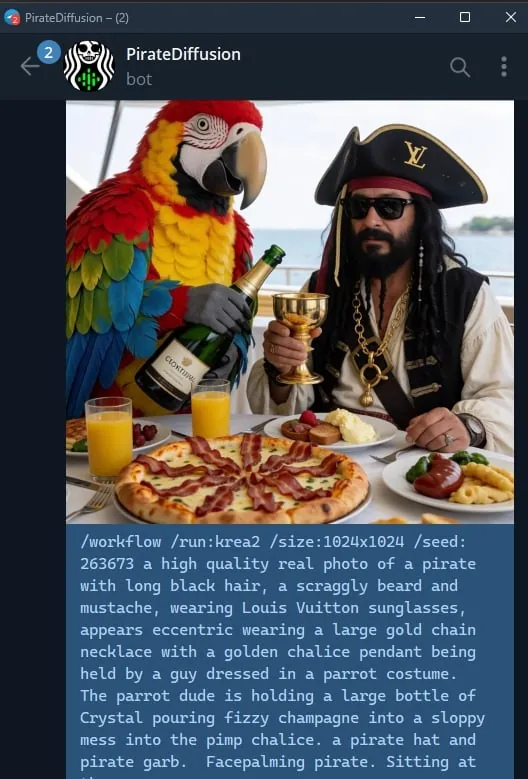
/workflow /run:krea2 /size:1024x1024 a high quality real photo of a pirate with long black hair, a scraggly beard and mustache, wearing sunglasses, a gold chain necklace and a golden chalice, having pizza with a giant parrot pouring him champagne
โมเดลวิดีโอและเสียงทำงานเป็นเวิร์กโฟลว์: /workflow /run: ตามด้วย slug ของเวิร์กโฟลว์ แล้วตามด้วยคำสั่ง prompt. ModelTrends แสดง slug ในกล่อง ShortCode ของเวิร์กโฟลว์เป็น /wf /run: รูปแบบสั้นของคำสั่งเดียวกัน.
คำแรกของ slug บอกว่าเวิร์กโฟลว์รับอะไร:
video- | ข้อความเป็นวิดีโอ: คำสั่ง prompt อย่างเดียวสร้างคลิป. |
animate- | ภาพเป็นวิดีโอ: ตอบกลับภาพด้วยคำสั่งและ prompt บอกว่าต้องการให้เคลื่อนไหวอะไร. |
omni- | ทั้งสองอย่าง: ทำงานจาก prompt อย่างเดียว หรือจากภาพที่ตอบกลับ. |
LoRA สำหรับวิดีโอใส่ระหว่าง slug กับ prompt. LoRA ที่ทำสำหรับภาพยังใช้ในเวิร์กโฟลว์ข้อความเป็นวิดีโอได้ แต่ทำงานดีที่สุดเมื่อคุณตอบกลับภาพด้วยเวิร์กโฟลว์ animate; การ์ดตัวอย่างบอกไว้. ตัวอย่างสด:
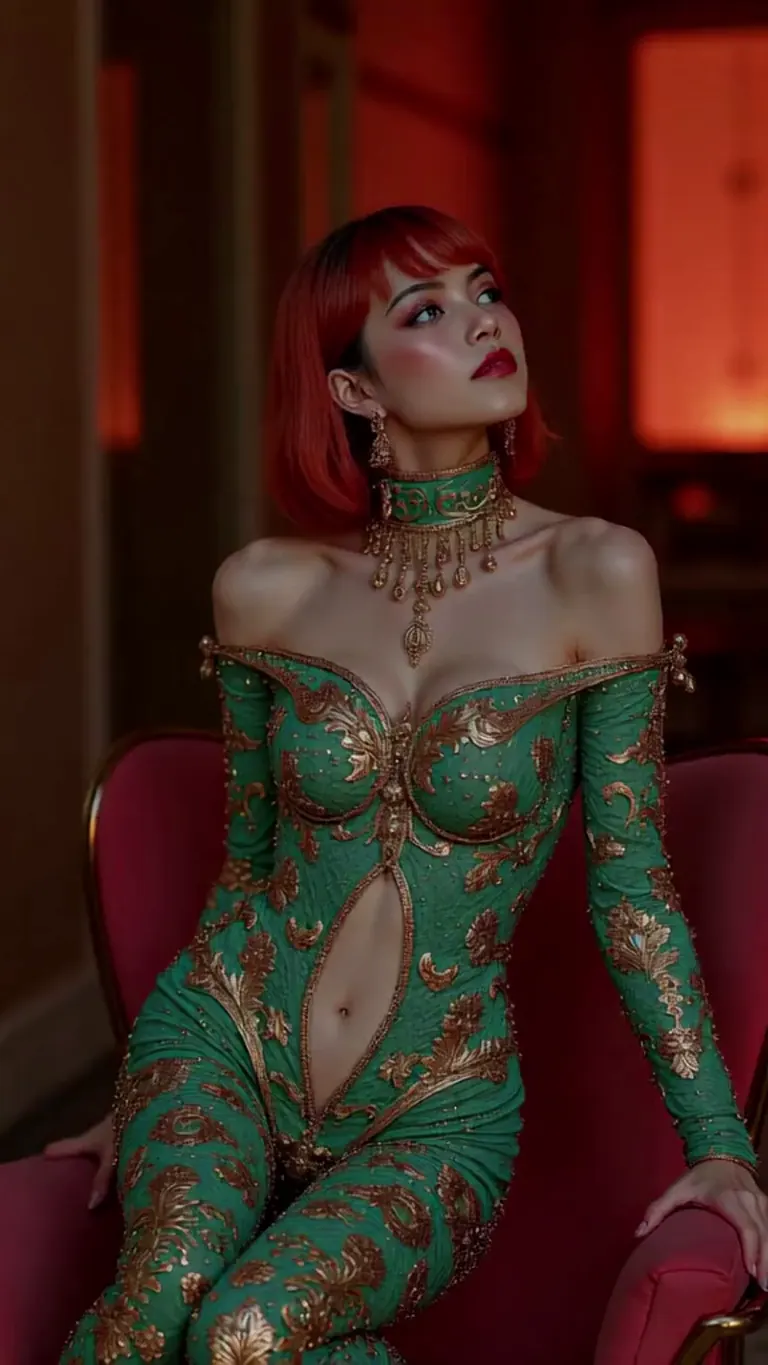
wan2.2-i2v-high-Screen Flood(屏幕淹水)
/workflow /run:video-wan22 <high-screen-flood-wan> then water suddenly rushes up from the bottom and submerges the entire screen.
ใช้งานได้ดีที่สุดกับการป้อนภาพ: ตอบกลับภาพแล้วใช้ /run:animate-wan22 แทน
Wan · LoRAเรนเดอร์โดย jeh88615 via BunchaPrompts
เวิร์กโฟลว์รับค่าพิเศษในช่อง slot เขียน /slot1: และอื่นๆ ต่อท้ายข้อความ; หน้าเวิร์กโฟลว์แต่ละหน้าอธิบายว่าช่องทำอะไร. เวิร์กโฟลว์เพลงใช้เนื้อเพลงเป็น prompt และใส่แนวเพลงในช่อง slot.
7. คัดลอกคำสั่งจาก ModelTrends
ตัวอย่างการเรนเดอร์ทุกตัวในหน้าของโมเดล ModelTrends มีปุ่มคัดลอกที่ให้คำสั่งพร้อมการตั้งค่าเป็นพารามิเตอร์ PirateDiffusion. วางหลัง /render และ ShortCode ของโมเดล.
คุณสามารถเขียนคำสั่งในภาษาของคุณเองได้. เพิ่ม /translate บอทจะแปลก่อนเรนเดอร์.
/render <krea2> /size:1024x1024 /translate un caballero de fantasía con armadura completa, fondo blanco
เวอร์ชันยาว (คู่มือ SDXL 2024)
คู่มือนี้เขียนสำหรับ SDXL ในปี 2024. คำสั่งยังใช้ได้; โมเดลและขนาดเป็นแบบที่กล่าวข้างต้น.